Technical Specifications: Parameters

1. BP_Spotlight_2D parameters

* Light & Shape Controls
Radius (Float)
- Controls the maximum reach or distance of the spotlight. Increase this value to cast light and shadows further across the map.
AngleDegree (Float)
- Adjusts the total field of view (FOV) or cone angle of the spotlight in degrees. A wider angle covers a broader area, while a smaller angle creates a narrow, focused beam.
* Raycasting & Precision Settings
RayStepDegree (Float)
- Determines the structural density and resolution of the shadow-casting rays. Lower values increase the number of raycasts for razor-sharp, precise shadow edges, while higher values optimize performance.
* System & Rendering Parameters
z_Height_Offset (Float)
- Adjusts the vertical positioning (Z-axis offset) of the 2D spotlight mesh. This ensures the light is perfectly layered above the floor tiles but cleanly occluded by wall collisions without clipping.
2. M_Spotlight parameters
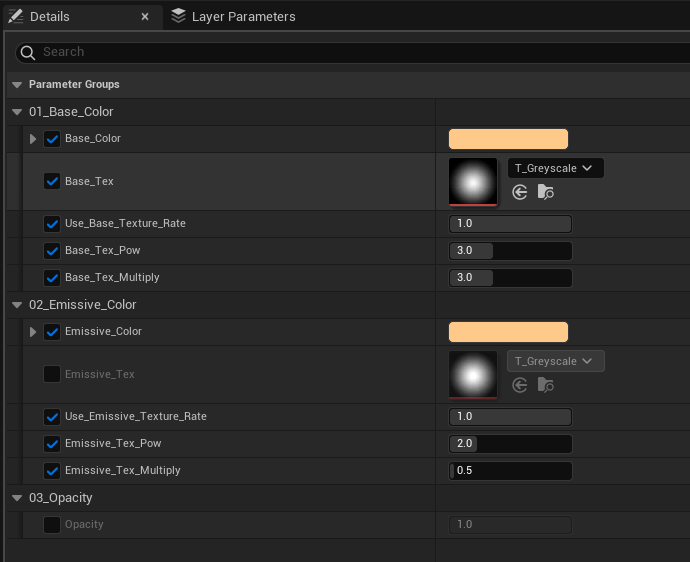
01_Base_Color
- Base_Color (Vector / LinearColor)
- Sets the primary color of the spotlight beam.
- Base_Tex (Texture2D)
- The source texture used to define the shape or falloff profile of the light beam (e.g., a grayscale gradient mask).
- Use_Base_Texture_Rate (Scalar / Float)
- Blends or scales the influence of the Base_Tex on the final base color output.
- Base_Tex_Pow (Scalar / Float)
- Controls the contrast and sharpness of the base texture gradient using a power (exponential) function. Higher values create a sharper falloff with tighter edges.
- Base_Tex_Multiply (Scalar / Float)
- A multiplier to adjust the overall brightness or intensity of the base color texture pass.
02_Emissive_Color
- Emissive_Color (Vector / LinearColor)
- Determines the color of the self-illumination (glow) effect, making the spotlight look vibrant and luminous in dark environments.
- Emissive_Tex (Texture2D)
- The grayscale mask texture used to control the distribution and shape of the emissive glow.
- Use_Emissive_Texture_Rate (Scalar / Float)
- Adjusts the blending ratio or intensity rate of the emissive texture profile.
- Emissive_Tex_Pow (Scalar / Float)
- Sharpens or softens the emissive glow gradient. Higher values push the glow toward the center of the beam, while lower values make it spread out more smoothly.
- Emissive_Tex_Multiply (Scalar / Float)
- Controls the actual glow strength or bloom intensity. Increase this value to make the light appear highly emissive and stand out vividly.
03_Opacity
- Opacity (Scalar / Float)
- Sets the overall transparency of the spotlight mesh. A value of 1.0 means fully opaque, while lower values make the light beam subtly blend into the background floor and obstacles.
'UE5 > 01.Fab_관련문서' 카테고리의 다른 글
| [Fab] Character Toon Shader (0) | 2026.07.11 |
|---|---|
| [Fab] 2D Dynamic Light - Document English. (0) | 2026.02.16 |
| [Fab] 2D Dynamic Light - Document Kor (0) | 2026.02.16 |
| [Fab] DynamicSky2D - Document English. (0) | 2026.02.13 |
| [Fab] PixelWeatherFX - Document. (0) | 2026.02.01 |